Native-language texting and app experience
Texting feels like iMessage, but with seamless AI translation. Slang, typos, misspellings, and mixed-language messages come through clearly. The whole app also appears in each user's preferred language.
Field team management for multilingual crews
Sermo helps landscaping, cleaning, and field-service teams run jobs without language barriers. Managers get translated messaging, an AI assistant that can take action, scheduling, confirmed-location job-site tracking, timesheet approvals, time off, clean Sermo Excel payroll exports, forms, document upload, e-signature, and push notifications in one workspace.
The demo above is live and clickable.
Current core features
Texting feels like iMessage, but with seamless AI translation. Slang, typos, misspellings, and mixed-language messages come through clearly. The whole app also appears in each user's preferred language.
Managers talk to Sermo like a real assistant. They describe what they want, and Sermo creates jobs, assigns employees or managers, messages teams, answers workspace questions, and asks for clarification before doing anything risky.
Employees get the same smooth translated texting experience with coworkers, groups, and All Staff chats inside the company workspace.
Managers create one-time or recurring jobs, assign app users and named crew, and send updates to each employee's calendar with push notifications.
Assigned app users have work time recorded when they enter or leave a confirmed job site. Managers confirm the job-site pin first; Sermo does not record a continuous route.
Automatic arrival and departure events create hourly records. Managers can review, edit, approve, reject, and keep time linked to the jobs where the work happened.
Employees request time off, managers see balances before approving, and approved full days automatically make that employee unavailable on the calendar.
Export a clean generic Excel file for the whole company or selected employees. The report includes employee totals, expandable job-level detail, and a polished Sermo header.
Build workplace forms for inspections, job notes, acknowledgments, and routine follow-ups. Teams complete them in the same workspace they already use.
Upload a PDF, place required signature, text, number, or date fields directly on the document, and send it to the right employees for completion.
Managers can open signed employee copies, email signed PDFs, and keep completed records on their own device instead of storing private documents on a public server.
Managers invite employees with a link. Employees click it, enter their name and preferred language, then wait on an approval screen until a manager lets them into the workspace.
New manager portal
Managers can securely connect a desktop with the Sermo app, then handle employees, job setup, schedules, timesheets, time off, and payroll preparation with a full keyboard. Changes stay connected to the same workspace the crew uses in the app.
Scan once with an active manager phone. No separate desktop password to remember or share.
Build schedules, import crews, review time, and prepare payroll comfortably from a full-size screen.
Portal updates and mobile activity stay together, so managers and field employees work from the same information.
Talk to the app
The assistant is built like a command center. A manager can type a normal sentence, Sermo resolves the employee, date, job, group, or workflow, and the app performs the action. If something is ambiguous, Sermo asks a short follow-up before it changes anything.
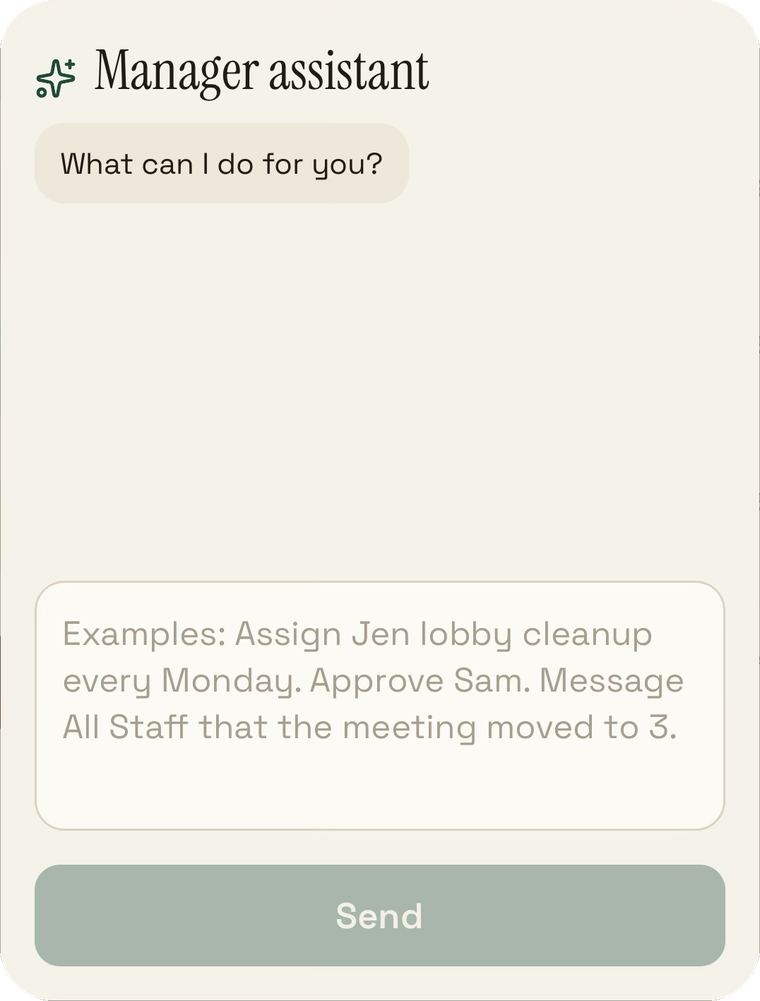
Creates the job, assigns the worker, and asks you to confirm the exact job-site pin.
Prepares a selected-employee Sermo Excel payroll export from approved timesheets.
Checks live job-site status and answers with the employees currently on site.
Operations
Sermo is built for teams where the real work happens away from a desk. Managers can keep people aligned, collect proof of work, prepare payroll, approve time off, and finish required documents without stitching together five separate tools.
Confirmed job-site geofences record arrival and departure events for assigned app users. Managers can see when each employee was on site without relying on manual check-ins.
Arrival and departure events build employee time records automatically. Managers review hours, edit mistakes, approve records, and include named crew hours where needed.
Job details, assigned workers, group chat, forms, and automatic time records stay linked to one job card from scheduling through completion.
Managers see remaining balances before they approve a request. Once approved, the employee is blocked as unavailable for those full days.
Required document fields appear directly on the PDF. Employees tap each field, fill it out, and save a signed copy the manager can review.
Attach forms to jobs for cleaning notes, site walkthroughs, inspections, safety checks, or any repeatable workflow that should not disappear into a chat thread.
Simple setup
Checkout collects the business name and manager phone number.
Sermo creates the workspace and texts the manager the setup link.
Employees enter their name and preferred language, then wait for manager approval.
They can write naturally. They can read clearly. Managers can run chat, schedules, confirmed-location time, forms, documents, and payroll prep in one place.